Live Activities
A reminder due within 24 hours waits on your Lock Screen with Done and Snooze.
When a vaccination, treatment or procedure is due within the next 24 hours, Pet Health+ puts a card on your Lock Screen and in the Dynamic Island. It counts down to the due time, and you can log it from there.
Steps
See it. The card shows the pet's name, the kind of reminder and its name ("Vaccine · Rabies"), and the time left. Up to three cards show at once, the soonest first.
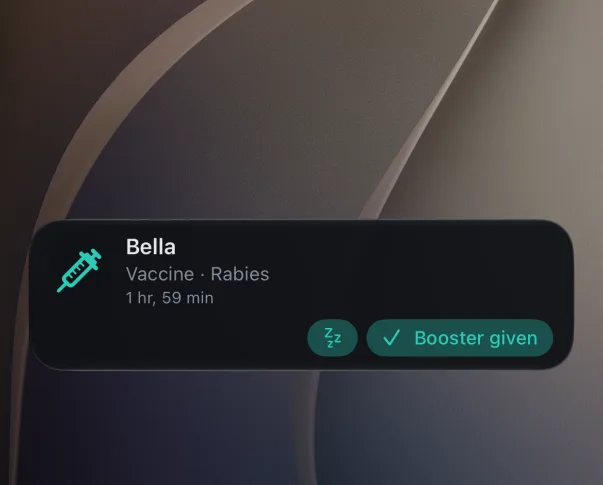
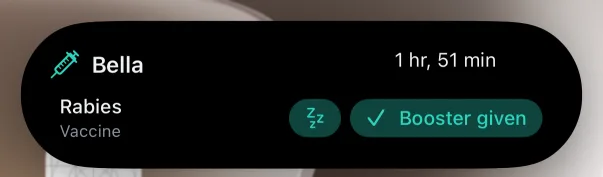
Log it. Tap Done, or Booster given / Vaccination given on a vaccine. The record is logged for today and the card says "Thanks" before it goes.
Snooze it. Tap the snooze button to hide it for an hour. The card says "Snoozed until 14:30".
Dismiss it. Swipe the card away. It stays away; it comes back only if the reminder's date or name changes.
Vet visits. On the day of a vet visit, a card appears at 9:00 with the vet's name (or "Regular Checkup") and a Got it button. Tap the card to open the pet.
Free or Pro
Live Activities are free.
Good to know
- Turn them off in the app under Settings → Notifications → Live Activities, or for all apps in the iPhone's Settings → Pet Health+.
- The same card shows in the Apple Watch Smart Stack and in CarPlay.
- On a pet shared with you, the card has only Got it.
- The card follows the language you chose in the app.
Get Pet Health+
Free to start, no account. For iPhone, iPad and Apple Watch.